
How to create a database, table and partition?
The following guide will show you how to 'Create a database, table and partition' with AWS
Pre-requisites:
1) Bucket created in Amazon S3.
2) Data pushed inside the bucket.
Step1: Create Database
Create Athena Database using the following code:
CREATE DATABASE <your-dbname>
Step 2: Create a Table
Create a table using the following code, replace <your-s3-bucket-names> with your bucket name (in yellow highlights).
CREATE EXTERNAL TABLE <your-dbname>.<table-name> (
   `device_id` string,
    `id_type` string,
    `latitude` float,
    `longitude` float,
    `horizontal_accuracy` float,
    `timestamp` bigint,
    `ip_address` string,
    `device_os` string,
    `os_version` string,
    `user_agent` string,
    `country_code` string,
    `source_id` string,
    `publisherid` string,
    `app_id` string,
    `location_context` string,
    `geohash` string)
 PARTITIONED BY (
   `year` int,
    `month` int,
    `day` int)
 ROW FORMAT DELIMITED
    FIELDS TERMINATED BY ','
  STORED AS INPUTFORMAT
    'org.apache.hadoop.mapred.TextInputFormat'
  OUTPUTFORMAT
    'org.apache.hadoop.hive.ql.io.HiveIgnoreKeyTextOutputFormat'
 LOCATION   's3://<your-s3-bucket-name>/'
 TBLPROPERTIES (
   'has_encrypted_data'='false',
    'parquet.compression'='GZIP')
Step 3: Add Partitions
Partition table using the following codes:
ALTER TABLE <your-dbname>.<table-name> ADD IF NOT EXISTS PARTITION
 (year=2019, month=12, day=1) location 's3://<your-s3-bucketname>/2019/12/01';
Note: The query has to be run daily. The above example is for 1 December 2019.
Businesses use mobile location data to understand movement patterns, analyze visitation behavior, improve location based services, build mapping products, support AI applications, and generate real world insights.
How To Run Basic Location Data Queries?
SCALE, STABILITY, AND TREND
A. Daily Active Users (DAU) & Average Daily Active Users (aDAU)
Daily Active Users (DAU) is the calculated total number of unique users seen, or delivered, in one day. This metric is important because it provides a measure of scale or reach within a particular location.
Average Daily Active Users (aDAU) is the calculated number of the average DAU delivered in a calendar month. aDAU is calculated as the total number of unique Users delivered each day, divided by the total days in the month (or partial month).
For example, aDAU = (SUM: total unique Users received each day) / (Applicable days in a month)
Since DAU is a volatile metric, due to variations in-app usage on a daily basis, the aDAU is most often used as the key evaluation metric for scale because it tends to be more stable over time. The graph below demonstrates daily fluctuations in DAU varying from 1,000,000 to 5,500,000 devices (at first sight appearing unstable), however, the aDAU across the 3-month period stays constant at around 3,000,000 devices.
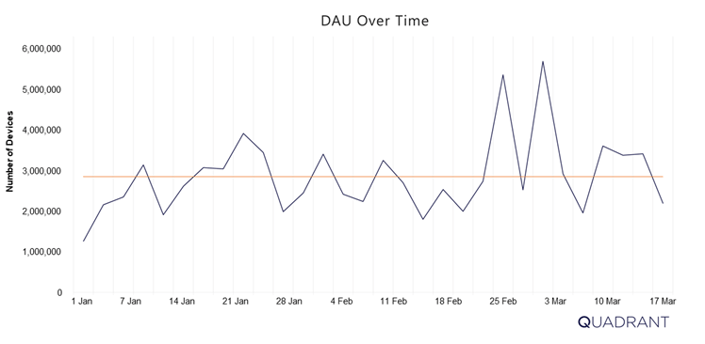
The aDAU for the month (Orange line) is often taken to provide a better approximation of scale
Below, we present the codes to extract the Average DAU of your data:
/* aDAU */
SELECT avg(DAU) as aDAU FROM ( SELECT day,COUNT(DISTINCT
lower(device_id))) AS DAU FROM [your_database.your_table]
WHERE (month = 2 AND year = 2020) GROUP BY 1)
B. Monthly Active Users (MAU)
Monthly Active Users (MAU) is the calculated total number of unique Users delivered in a calendar month.
Similar to the DAU metric, this metric is useful to evaluate the total scale or reach of a dataset within a particular location.
Below, we present the codes to extract the MAU of your data:
/* MAU */
SELECT count(distinct (lower(device_id))) AS MAU
FROM [your_database.your_table]
WHERE (month = 2 AND year = 2020)
C. Plotting as a Time Series
Apart from calculating a point estimate, aDAU and MAU are also useful when plotted in a time series in order to show trend and seasonality. As most organizations who use location data require data feeds over a period of time, it is important to understand how scale changes over time. In particular, Quadrant is constantly working to improve its coverage globally by adding new data sources which result in an increase in MAU and aDAU counts over time.
For certain organisations, such as market research and financial firms, identifying and accounting for trends and seasonality is very important as it may skew results from their models.
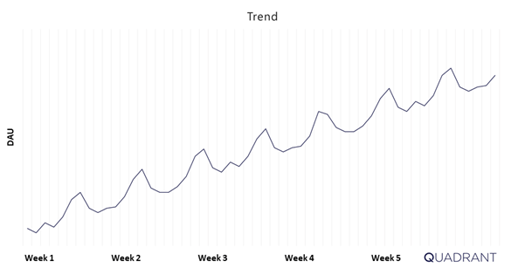
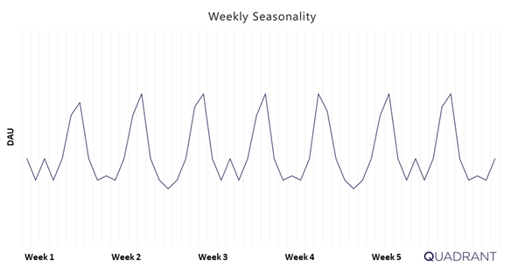
In the charts above, we can see clear sign of uptrend and weekly seasonality in the DAU.
These factors could be identified and accounted for in your models.
DEPTH
A. DAU/MAU Ratio
The DAU/MAU ratio provides a high-level look at how many days in a given month are devices seen within the dataset. In other words, it provides an indication of the frequency with which a user is being identified or seen within the dataset.
The DAU/MAU ratio is bounded from 0 to 100%. A ratio closer to 100% suggests that the devices in the dataset are seen more days in the month, and therefore show a good level of engagement with most users being seen daily.
This simple ratio is derived by dividing DAU by MAU to get the ratio percentage:

For example: If you have 1,000,000 daily users and 2,000,000 monthly users, the DAU/MAU ratio is 50%.
Depending on the use case, different DAU/MAU will be required from a dataset. For example, if an advertiser is building customer audiences, it may be sufficient to have a low DAU/MAU ratio as they are simply looking for devices seen within specific locations, e.g. all devices seen within 1 KM of Central Park in New York. Conversely, an analytics and research company looking to understand consumer behaviours will want a high DAU/MAU ratio as they are trying to identify patterns in behaviours, e.g. in the morning, people living East of Manila Bay travel West for work, of those, 60% travel North at lunchtime, and 40% travel South in the evening. Therefore, the more granularity a use case requires within a single day, the higher the DAU/MAU ratio should be.
B. Events Per Device
In the context of location data, an event is defined as a single data point from one device containing location data attributes, such as, latitude, longitude, timestamp, horizontal accuracy, etc. Check out our data dictionary for a full list of attributes available.
A useful metric often used for evaluation is events per device. This metric shows how many events are logged per device in a given period of time (day, week, month etc.). Most often events per device per day are used to gauge the density of the data within 1 given day. Most companies and organization use this metric as a measure of depth, as more events per device provide more information on the users movements and habits.
Spatiotemporal Analysis of Events
BE CAREFUL. While this metric is a good starting point into the depth of the data, it is recommended not to rely solely on this metric.
Consider this, you may be drawn to conclude that a device emitting over 200 events per day will provide a lot of information about the user of that device. However, if that device is emitting this information from a single location, then the value of all this information is significantly reduced. This is because location data has an added dimensions of time and space (also known as a spatiotemporal), which is not captured in this metric.
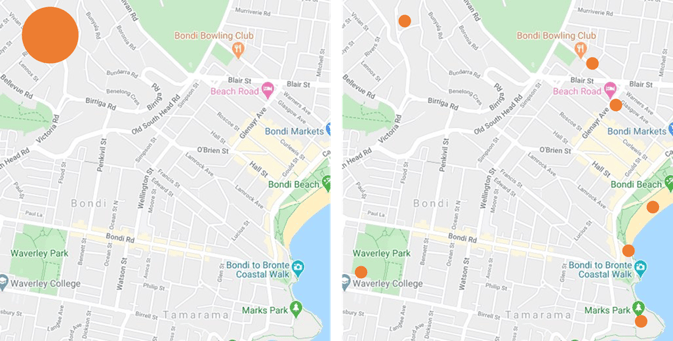 The map on the LHS shows 200 events points in location. The map on the RHS shows 7 events distributed spatially.
Time Series Analysis of Events
It is also useful to look at events per device per day in time series.
Due to different types of data sources, user habits, SDK and device-specific settings, the distribution of events per device per day may be irregular over time. For example, it is possible that events could be highly concentrated within a short window. The following chart illustrates this point visually.
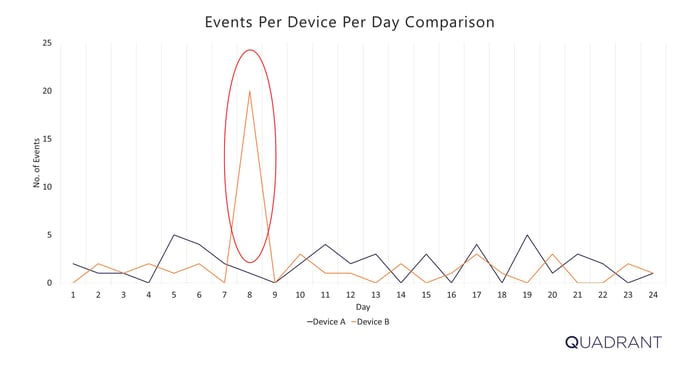
Events Per Device Per Day in times series of 2 devices (in orange and blue)
Below, we present the codes to extract the Average Events Per Device Per Day :
/* AVERAGE EVENTS PER DEVICE PER DAY */
SELECT AVG(avg_evnts_per_dev) as avg_evnts_per_device_per_day
FROM
(SELECT device_id,
avg(event_cnt) as avg_evnts_per_dev
FROM
(SELECT lower(device_id) AS device_id,
count(*) AS event_cnt,
day
FROM
(SELECT device_id,
day
FROM [your_database.your_table]
WHERE (month = 3 AND year = 2020) )
GROUP BY 1, 3)
GROUP BY 1)
GROUP BY 1;
Below, we present the codes to extract the Average Events Per Device Per Day by Bracket (0 - 10 events, 10 - 50 events, 100 - 500 events, 500 - 2,500 events, and over 2,500 events):
/* AVERAGE EVENTS PER DEVICE PER DAY BY BRACKETS */
SELECT kv['0 - 10'] AS lt_10, kv['10 - 50'] AS betw_10_50, kv['50 - 100'] AS betw_50_100, kv['100 - 500'] AS betw_100_500, kv['500 - 2.5k'] AS betw_500_2500, kv['over 2.5k'] AS gt_2500
FROM
(SELECT map_agg(EventRange, cnt) kv
FROM
(SELECT EventRange,
cnt
FROM
(SELECT CASE WHEN avg_evnts_per_day >= 0 AND avg_evnts_per_day <= 10 THEN '0 - 10'
WHEN avg_evnts_per_day > 10 AND avg_evnts_per_day <= 50 THEN '10 - 50'
WHEN avg_evnts_per_day > 50 AND avg_evnts_per_day <= 100 THEN '50 - 100'
WHEN avg_evnts_per_day > 100 AND avg_evnts_per_day <= 500 THEN '100 - 500'
WHEN avg_evnts_per_day > 500 AND avg_evnts_per_day <= 2500 THEN '500 - 2.5k' ELSE 'over 2.5k'
END EventRange, count(device_id) AS cnt
FROM
(SELECT device_id,
avg(event_cnt) as avg_evnts_per_day
FROM
(SELECT lower(device_id) AS device_id,
count(*) AS event_cnt,
day
FROM
(SELECT device_id,
day
FROM [your_database.your_table]
WHERE (month = 3 AND year = 2020) )
GROUP BY 1, 3)
GROUP BY 1)
GROUP BY 1)
)
);
C. Days Seen Per Month and Hours Seen Per Day
Two metrics additional metrics of interest are, Days Seen Per Month and Hours Seen Per Day, which provide a temporal element to the distribution of events.
Days seen per month is defined as the number of devices seen X number of distinct days per month.
Hours seen per day is defined as the number of devices seen X number of distinct hours per day.
As is the case with events per day, these 2 metrics have their limitations, in that they not distinguishing the number of events seen per day, e.g. having 100 events seen or 3 events seen in a day would both count as 1 distinct day seen per month under this metric.
Below, we present the codes to extract the Average Days Seen Per Month:
/* AVERAGE DAYS SEEN PER MONTH */
SELECT AVG(dayCount) as average_days_seen_per_month
FROM
(SELECT device_id,
count(distinct day(from_unixtime(timestamp/1000))) AS dayCount
FROM
(SELECT lower(device_id) AS device_id,
timestamp
FROM [your_database.your_table]
WHERE (month = 2 AND year = 2020) )
WHERE month(from_unixtime(timestamp/1000)) = 2 AND year(from_unixtime(timestamp/1000)) = 2020
GROUP BY 1)
GROUP BY 1
Below, we present the codes to extract the Average Days Seen Per Month by Brackets (February 1 - 29):
Note, for months with 30 and 31 days, additional brackets (denoted by 'kv') will be required.
/* AVERAGE DAYS SEEN PER MONTH BY BRACKETS */
SELECT kv['1'] AS no_of_devices_seen_for_1_day,kv['2'] AS no_of_devices_seen_for_2_days, ... ,kv['29'] AS no_of_devices_seen_for_29_days
FROM
(SELECT map_agg(daycount,num_user) kv
FROM
(SELECT cast(dayCount AS varchar(8)) AS daycount,
num_user
FROM
(SELECT dayCount,
count(device_id) AS num_user
FROM
(SELECT device_id,
count(distinct day(from_unixtime(timestamp/1000))) AS dayCount
FROM
(SELECT lower(device_id) AS device_id,
timestamp
FROM [your_database.your_table]
WHERE (month = 2 AND year = 2020) )
WHERE month(from_unixtime(timestamp/1000)) = 2 AND year(from_unixtime(timestamp/1000)) = 2020
GROUP BY 1)
GROUP BY 1)
)
)
Below, we present the codes to extract the Average Hours Seen Per Day:
/* AVERAGE HOURS SEEN PER DAY */
SELECT AVG(hour_seen) as average_hours_seen_per_device
FROM
(SELECT day(from_unixtime(timestamp/1000)) AS day,
approx_distinct(hour(from_unixtime(timestamp/1000))) AS hour_seen,
device_id
FROM
(SELECT lower(device_id) AS device_id,
timestamp
FROM [your_database.your_table]
WHERE (month = 2 AND year = 2020) )
GROUP BY 1, 3)
GROUP BY 1);
Below, we present the codes to extract the Average Hours Seen Per Day by Brackets (1 - 24 hours):
/* AVERAGE HOURS SEEN PER DAY BY BRACKETS */
SELECT kv['1'] AS no_of_devices_seen_for_1_hr,kv['2'] AS hr_seen_2 AS no_of_devices_seen_for_2_hrs, ..., kv['24']AS no_of_devices_seen_for_24_hrs
FROM
(SELECT map_agg(avg_hr_seen_per_day,no_of_devices) kv
FROM
(SELECT CAST(avg_hr_seen_per_day AS VARCHAR(8)) AS avg_hr_seen_per_day,
no_of_devices
FROM
(SELECT avg_hr_seen_per_day,
count(device_id) AS no_of_devices
FROM
(SELECT device_id,
ROUND(avg(hour_seen)) as avg_hr_seen_per_day
FROM
(SELECT day(from_unixtime(timestamp/1000)) AS day,
approx_distinct(hour(from_unixtime(timestamp/1000))) AS hour_seen,
device_id
FROM
(SELECT lower(device_id) AS device_id,
timestamp
FROM [your_database.your_table]
WHERE (month = 2 AND year = 2020) )
GROUP BY 1, 3)
GROUP BY 1)
GROUP BY 1)
)
);
ACCURACY
A. Horizontal Accuracy
Horizontal accuracy is the measure of GPS accuracy, expressed in meters, as reported by the device's operating system.
Horizontal Accuracy is a radius around a 2-dimensional point, implying that the true location of the data point is somewhere within the circle formed by the given point as a center and the accuracy as a radius. Therefore, in the example below, the exact location of the device will be anywhere within the orange shaded circle.
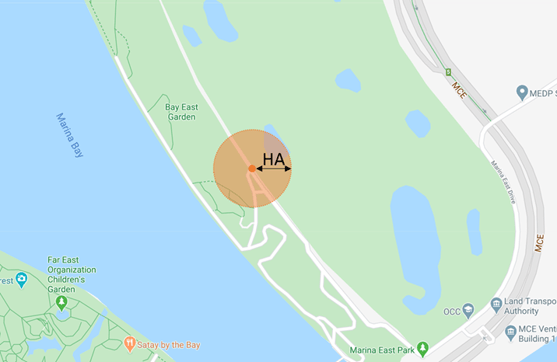
GPS accuracy of a mobile device is not solely dependent on the GPS sensor itself, there are a lot of factors like network signal, nearby cell towers, nearby Wi-Fi, onboard sensors, inertial navigation from the accelerometer, gyroscope, and compass. All of these factors have an impact on the recorded horizontal accuracy.
It is important to understand horizontal accuracy, as different use cases require different levels of accuracy readings. For example, heatmaps and analysis of mobility at city levels can generally be done accurately with higher levels of horizontal accuracy, while retail analysis on typically small venues such as restaurants and shops requires smaller and more precise levels of horizontal accuracy.
Below, we present the codes to extract the Average Horizontal Accuracy of your data:
/* AVERAGE HORIZONTAL ACCURACY */
SELECT AVG(horizontal_accuracy) as avg_horizontal_accuracy
FROM [your_database.your_table]
WHERE (month = 2 AND year = 2020) AND (try_cast(horizontal_accuracy as varchar)<>'');
Below, we present the codes to extract the Number of Events by Brackets of Average Horizontal Accuracy of your data (0 - 10m, 10 - 20m, 20 - 50m, 50 - 100m, and 100 - 200m):
/* NUMBER OF EVENTS BY BRACKETS ON AVERAGE HORIZONTAL ACCURACY */
SELECT kv['0 - 10'] AS lt_10, kv['10 - 20'] AS betw_10_20, kv['20 - 50'] AS betw_20_50, kv['50 - 100'] AS betw_50_100, kv['100 - 200'] AS betw_100_200
FROM
(SELECT map_agg(HorRange, cnt) kv
FROM
(SELECT HorRange,
cnt
FROM
(SELECT case when horizontal_accuracy >= 0 and horizontal_accuracy <= 10 then '0 - 10'
when horizontal_accuracy > 10 and horizontal_accuracy <= 20 then '10 - 20'
when horizontal_accuracy > 20 and horizontal_accuracy <= 50 then '20 - 50'
when horizontal_accuracy > 50 and horizontal_accuracy <= 100 then '50 - 100'
when horizontal_accuracy > 100 and horizontal_accuracy <= 500 then '100 - 200'
else 'over 5k' end HorRange, count(*) as cnt
FROM [your_database.your_table]
WHERE (month = 2 AND year = 2020) AND (try_cast(horizontal_accuracy as varchar)<>'')
GROUP BY 1)
)

);
How does Geohash work?
GEOHASH OVERVIEW
At Quadrant we constantly strive to help our partners and customers maximise the benefits of location data they procure from us. We include Geohash as a data field to our location datasets which is a standard method to assess the movement of a device (using the common Geohash prefix associated with all sightings). But what is Geohash? What value does it add? This guide will answer FAQs about Geohash, elaborate on how to run simple Geohash queries, and explain how Geohash benefits your business.
Our data engineering team has developed proprietary algorithms for data cleaning and deduplication, ensuring that we deliver high-quality and reliable data. We also host a wide variety of potent, pre-configured Artificial Intelligence (AI) algorithms developed by an in-house data science team, that can help you use location data in an intuitive, fast and efficient way. Quadrant algorithms are tools to assist partners and customers perform faster analysis, discover hidden patterns, and gain actionable insights with geospatial data. These models are based on the most common use cases like geofencing of location data and populating with nearest Points-of-Interest (POI).
WHAT IS A GEOHASH?
Geohash is a geocoding method used to encode geographic coordinates (latitude and longitude) into an alphanumeric string. By dividing a larger region into grids we can delineate an area on a map, which is called a cell, with varying resolutions.
Geohash is one of the convenient ways of expressing a location (anywhere in the world) using an alphanumeric string. Geohash is a unique string that is derived by encoding/reducing the geographic coordinates (latitude and longitude) into a short string of digits and letters. Precision is a number between 1 and 12 that specifies the precision (i.e., number of characters) of the Geohash. Each additional character of the Geohash adds precision to your location. Geohashing can be used for various analyses like spatial indexing, spatial binning, proximity searches, location searching, creating unique place identifiers, etc.
Imagine the world is divided into a grid with 32 cells. The first character in a Geohash identifies the initial location as one of the 32 cells. This cell will also contain 32 cells, and each one of these will contain 32 cells (and so on repeatedly). Adding characters to the Geohash sub-divides a cell, effectively zooming into a larger area. The longer the string, the more précised the location. A Geohash string could look like this - qfb9c3mw8hte.
Example of Geohash representation
| Latitude |
1.320527 |
| Longitude |
103.81726 |
| Precision |
9 |
| Geohash |
w21zd2mkt |
Key Features
- Express any location on the surface of the Earth using an alphanumeric string.
- Alphanumeric strings are made up of characters including numbers 0-9 and letters a-z.
- The Earth is split into 32 rectangles and each section is assigned a character.
- Each rectangle is then split into 32 sub rectangles of its own and assigned a character.
- The same operation is repeated on every new rectangle adding more characters.
- The longer the string, the smaller the rectangle & higher the précision (max 12 characters).
| Open Source Tools Geohash Converter | Geojson | Movable Type Scripts | Go free-range | Geomesa | Kepler |
HOW EFFICIENT IS A GEOHASH?
Geohash allows for significantly faster geofencing than conventional querying – minutes instead of hours or even days. Geohash provides a multitude of efficiencies from different perspectives:
Faster Querying – Querying for regions or sub-regions take significantly less time to complete.
Reduce Input Data Load – To input data in your algorithm, you only take the necessary data. For e.g. if you want to understand behaviour of people in Kuala Lumpur, you do not need to key in the whole of Malaysia but only the points within Kuala Lumpur, which can be found quickly by using the Geohash.
Cost-Effective – If you run queries on cloud services like AWS or GCP, you will be charged based on the data scanned. The Geohash scans less data, reducing the charges incurred, provided data is partitioned in an appropriate manner.
Ease of use - These algorithms and models need minimal configuring. Users can set up and run them within a few minutes.
Actionable Information - The output derived from these algorithms and models will provide actionable information for your use case, almost instantly.
Up to Date Algorithms and Models - These algorithms and models were developed to solve real-world needs and will need updating to reflect the latest industry needs.
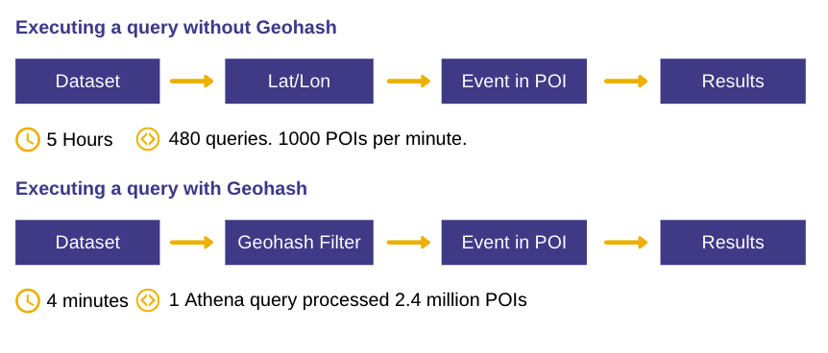
To demonstrate how Geohash helps derive geospatial intelligence faster, we did a trial analysis of our own with a specific category of Points-of-Interest (POI). We geofenced 2.4 million restaurants in APAC using one Athena query. Using Geohash it took us 4 minutes to execute this query as opposed to 5 hours with 8 parallel queries for the same data (without Geohash).
ENCODING THE GEOHASH
Looking at the image below, we represent Geohash by splitting the world into recursive grids.
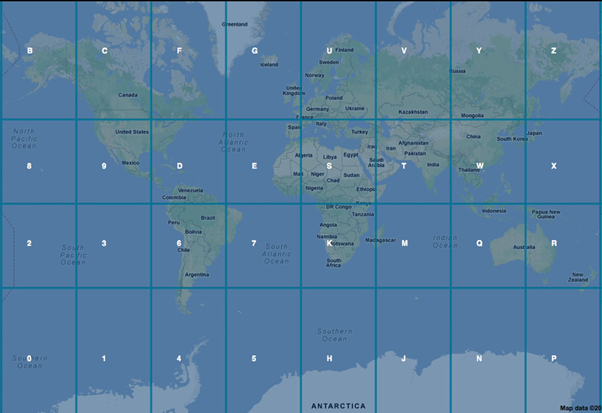
Image: World Map with one layer of Geohash
Next, we look at how Geohash works when applying a second layer to split the recursive grids further.
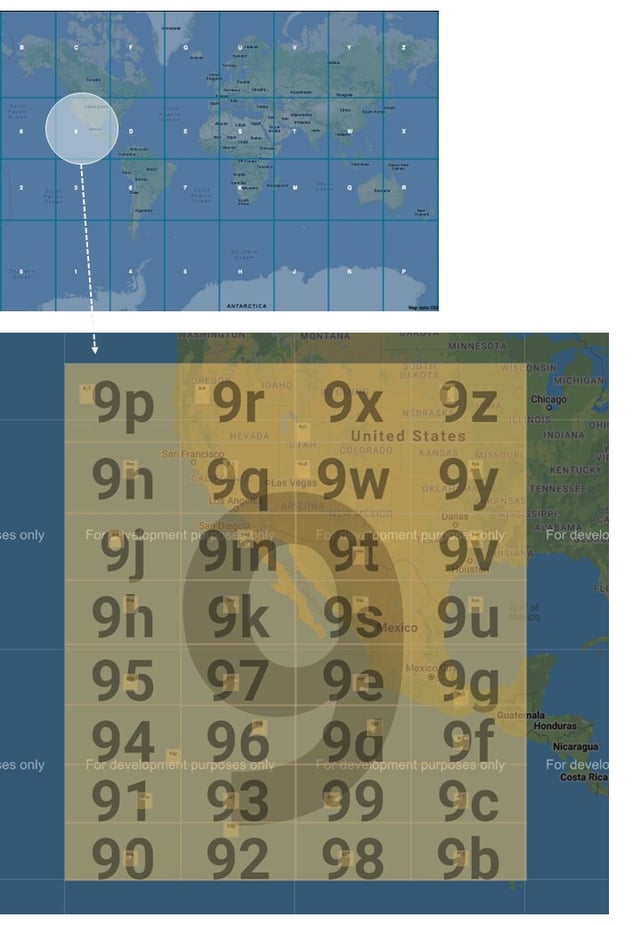
Image: World Map with 2 layers of Geohash
The grids above are represented by strings and numbers. The top-most grid is represented by 1 character, and if you choose a second-level grid within a grid, it is represented by appending another character and so on. As you 'zoom' into each grid, your grids become smaller, and the length of your geohash increases.
Geohash ranges from 1 to 12 characters as shown in the table below:
| GeoHash length |
Grid Area width x height |
|
1 |
≤ 5,000km X 5,000 Km |
|
2 |
≤ 1,250km X 625km |
|
3 |
≤ 156km X 156km |
| 4 | ≤ 39.1km X 19.5km |
| 5 | ≤ 4.89km X 4.89km |
| 6 | ≤ 1.22km X 0.61km |
| 7 | ≤ 153m X 153m |
| 8 | ≤ 38.2m X 19.1m |
| 9 | ≤ 4.77m X 4.77m |
| 10 | ≤ 1.19m X 0.596m |
| 11 | ≤ 149mm X 149mm |
| 12 | ≤ 37.2mm X 18.6mm |
Note that the maximum level of geohash precision is 12 and it represents a tile of 3.7 cm * 1.9 cm. So, finding a location can be very efficient with Geohash.
Therefore, the benefit of geohash is that a geo-coordinate (latitude and longitude) can be encoded to a Geohash (string) which in turn can provide a lot of operational efficiency benefits more of which are explained below.
How do we do a Geohash query?
There are lots of libraries available based on your programming language that can be used to create Geohash.
| Programming Language |
Library |
Relevant Links |
|
Python |
For python, you have libraries like Geohash |
|
|
Nodejs |
For nodejs |
|
|
Java Maven |
For Java maven dependency |
|
| Others | ||
| Visual |
For a visual example |
|
Use Case: How you can execute a Geohash query
Objective: To find people in Singapore Botanical Gardens
Methodology: The Singapore Botanical Gardens could be encapsulated within the geohashes w21zd2, w21z6r, w21z6q, w21z6m. It includes some regions out of the botanical gardens but let’s assume you will use a point-in-polygon algorithm to remove the points outside the botanical garden.
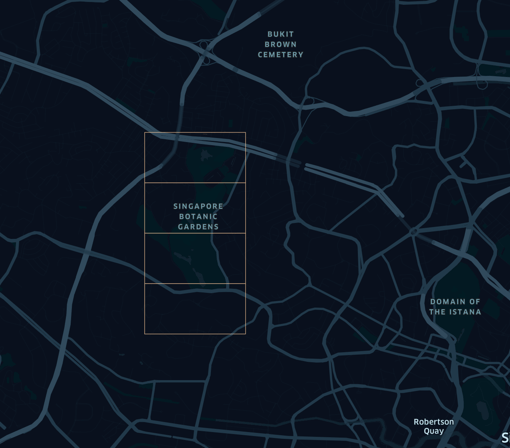 Image: Singapore Botanical Gardens with Geohash
The following steps are done to retrieve points in Singapore Botanical Gardens:
Step 1: Using the query below, you will first filter out the points within the 4 Geohashes mentioned above (w21zd2, w21z6r, w21z6q, w21z6m)
SELECT * from input_data where country = 'SG' and substr(geohash,1,6) IN ('w21zd2', 'w21z6r', 'w21z6q', 'w21z6m')After running the above query, you now have the data points from the 4 Geohashes,
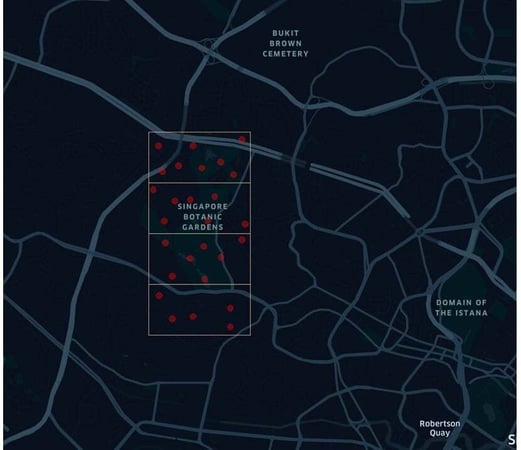 Image: Singapore Botanical Gardens with Data Points from 4 Geohashes
Step 2: Having created a smaller dataset based on the 4 Geohashes, you can refine further by taking these data points and inputting them into your algorithm (e.g. circle or polygon query) to get the points specifically within the Singapore Botanical Gardens.
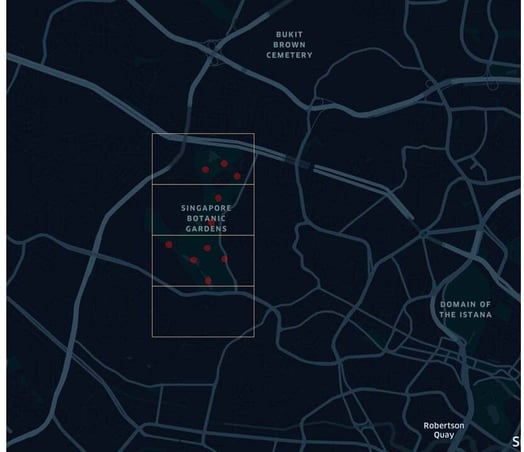 Image: Data Points seen within Singapore Botanical Gardens after refining
Note: All data provided by Quadrant to our clients is based on Geohash, and Geohash is a standard attribute provided within our data feeds.
About Geofencing queries
GEO-FENCING QUERY

A geofence is a virtual fence around real-world locations, such as, restaurants, airports, public venues or shopping malls. This tool allows Quadrant Platform’s users to set a customized geofence to obtain the Ad-IDs of distinct users that fall within the specified area, that can vary in scale and shape – as small as a store or as big as a city.
Ad-ID is the industry standard for identifying advertising assets across all media platforms, increasing the transparency and accountability in the advertising marketplace. Quadrant Geofencing Query of Ad-IDs enables a more granular audience measurement across multiple platforms, allowing delivery of targeted messaging and creatives to the right people, at the right moment at the right place.
Types of Geo-fencing query:
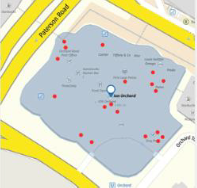
Circle Query Polygon Query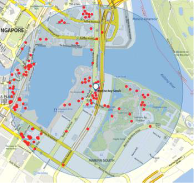
FOOTFALL QUERY
Returns the daily footfall of the specified geofence. This tool can be used in multiple scenarios, from retailers looking for insights to increase the footfall to physical stores to authorities assessing traffic patterns to urban developers researching targeted areas.
Estimate the footfall of any area, region or Point Of Interest. Analyse and discover footfall patterns such as seasonality of any area, region or Point Of Interest
Uncover correlations between footfall and other variables such as store revenue. Quadrant currently offers two types of Geofence Footfall Queries:
- Footfall Circle Query
- Retrieves the footfall within a circle geofence
- Useful for most standard situations
- Footfall Polygon Query
- Retrieves the footfall within a polygon geofence
- Useful for more targeted and irregularly shaped regions
NEAREST POI MODEL
This machine learning model identifies the nearest Point Of Interest for a given location based on the latitude and longitude values that return the daily footfall in a geofence. This model is a python-based model built using scikit learn library. It was trained using K-Nearest-Neighbours (KNN) and can also be deployed in Apache Spark framework using PySpark library.
- Analyse & understand the traveling habits of your audience
- Identify time & speed of travel from one POI to another
- Identify routes taken by an audience between two POIs
How do I run a Geohash query?
How can the algorithms be accessed?
We provide access via GitHub repository. Smaller file sizes can also be sent via email.
Can the algorithms be utilized/applied in any country/region?
Yes. The queries are tailored for location data and can be utilized irrespective of the location of the POI model. Customers can use their own POI database to train the model or can procure data from Quadrant (for select regions). We can assist them in tweaking the codes to fit their model if needed.
Can a timeframe be specified for the queries?
Yes. A timeframe could be added to the queries. We can set timeframe constraints like minimum and maximum. Depending upon how the files and formats are structured within the client’s premise, the query can work or might throw errors. For e.g. Running queries on one specific day would be easy but running one query on 2 months data might throw an error.